

Sequim MLS on your iPod – Now you can search the Sequim MLS on your iPod. For all you passionate iPod Phone and iPod Touch fans in the virtual iPod world, you can now search the entire Sequim MLS and Port Angeles MLS with your iPod. Here’s how easy it is.
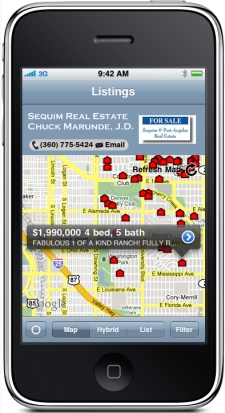
From your iPod go to Apps and search for “IDX” without the quotes. Download the app called “myAgent by IDX” (by IDX, Inc.). When you load it you will be asked for a Sequim code. The code is “3523” and once you type it in you won’t ever have to type it in again.
Load the app, type in the Sequim code of 3523, and you are looking at a nice map showing all the Sequim MLS listings and the Port Angeles MLS listings. You simply drag the map across the screen to move around to the neighborhood you want.
To narrow your search for the perfect home, simply click on “Filter” at the bottom right, and you can select a price range, number of bedrooms, bathrooms, and square footage.
Once you pull up a screen with some listings represented as little red houses, you can touch a house and it opens up with the price and address. Touch the little blue arrow, and you get the full listing with all the photos and details.
Come on, admit it: This is so cool!
Search the Sequim MLS on your iPod, another powerful and absolutely free service courtesy of Chuck Marunde, your favorite Sequim Buyer’s Agent.
Last Updated on July 27, 2012 by Chuck Marunde


























You’re one of the few Realtors out there on the cutting edge of technology. Having your MLS search on smart phones and having an iTunes app buyers can use is really impressive. By the way, I use your phone app to search for Sequim real estate. Thnx.
I use my iPad to look at Sequim real estate and I love your app. Thanks for doing that. I’ve searched a lot of Sequim sites, and your Sequim Real Estate Blog is by far the best site out there. You’ve got a lot of good content as well as tools that I love, and by the way, I appreciate the fact that everything you offer is free and doesn’t require me to register my personal information. Looking forward to meeting you when we come up. Thanks Chuck!